Showing posts with label WCF. Show all posts

Tuesday, 1 April 2014

Creating and Consuming SAML 2.0 Tokens using WIF

With the introduction of Windows Identity Foundation 4.5 Microsoft removed the Visual Studio templates that could be used to generate a custom WCF STS service. The custom STS could then be used to issue SAML 2.0 tokens based on custom credentials passed with the WS-Trust request to the custom STS.

The underlying classes are still available to use for creating a custom STS, without the templates available it is still possible to create a custom WCF STS service but it requires a bit more effort.

There is however an alternate means to generate SAML 2.0 tokens using WIF that forgoes the need to create a custom STS. This is useful in scenarios involving proprietary systems that have custom protocols and authentication, that also do not lend themselves well to integration with ADFS etc.

To explain how this can be achieved I will break the problem down into two parts:

Part 1: Creating a SAML 2.0 Token using WIF 4.5

Part2: Consuming a SAML 2.0 Token using WIF 4.5

Tuesday, 29 January 2013

Custom WCF UserNamePasswordValidator Performance Impact

Recently I have had to perform some debug/analysis on an unusual case of clients receiving timeouts on a critical WCF service in a production environment. I use the term “unusual” to describe the timeouts due to the nature in which these timeouts occur combined with the operation behaviour of the service when they are occurring. That and the timeouts are extremely severe, every client experiences timeouts, in my experience with WCF is not an expected operational behaviour of the WCF stack. Under normal high load scenarios a percentage of clients will experience timeouts or receive the expected Server To Busy fault when the WCF service has breached its configured throttle values.
In this specific case knowing the operation capabilities of the WCF service in question I knew that the amount of load on the server although high was well within the capacity of the service in question. Nor was the load significant enough to breach the configured service throttles. I eventually got to the bottom of the issue through debug and crash dump analysis. It was an unexpected/undocumented behaviour of the WCF stack coupled/influenced by a specific behaviour of a custom UserNamePasswordValidator used by the WCF service.
I thought it would be worth describing the problem in more detail in the hope it might help others who experience WCF Service performance issues, that done seem to "make sense", giving one additional diagnostic check to ad to the toolbox.

Symptoms

The symptoms of the service outage are as follows:
  • A high percentage of clients, > 90%, receive timeouts or Server To Busy exceptions
  • The Instances service performance Counter is at or close to the the configured or defaulted ServiceThrottlingElement.MaxConcurrentInstances value
  • The Calls Per Second Rate service performance counter is low or at 0 for periods of time
  • If the service is deployed in an IIS app pool the ASP.NET Application Performance Counter  Pipeline Instance Count will be at or close to its configured or defaulted value
  • The Security Validation And Authentication Failures performance counter can be non zero
  • The service appears to be deadlocked or being starved of requests, the service is not writing log files or updating database etc. but clients experience timeouts or very slow reponses
  • Very low CPU utilisation by the process in question


Cause

After generating a process memory dump, from the WCF Service. After examining all of the threads stacks by executing the EEStack command it was clearly evident that most of the threads in the process where blocked on the unmanaged windows API method GetQueuedCompletionStatus which is a blocking I/O call. One call was blocked on the Validate method of the UserNamePasswordValidator.
It transpires that the the Validate method of the custom UserNamePasswordValidator used by the WCF service, talks to a proprietary back office system to validate a clients username and password. To prevent a client from brute forcing a users password it will delay the username/password validation response for 5 seconds after the nth unsuccessful attempt. This has very serious consequences for the throughput of the WCF service.


Demonstration Code And Results

To demonstrate this problem I have put together a simple demo base on one of the WCF sample applications. It is the calculator application that implements a simple custom UserNamePasswordValidator. The code itself is not really the interesting part and is pretty trivial, the intent is to demonstrate the symptoms.


Setup

Run the Setup.Bat file in the .\UserNamePasswordValidator\CS folder. Note you should run this from a VS2010 command prompt with administrative privileges. As it creates a test certificate and grants access to the private key for encryption/signing the message credentials.


Clean-up

Run the CleanUp.bat file in the .\UserNamePasswordValidator\CS folder. Note you should run this from a VS2010 command prompt with administrative privileges. AS it deletes the test certificate created by setup.bat
Open the solution in VS2010 running as a administrator as the code attempts to register a http.sys listener on port 8001.
There are a number of application settings that can be used to modify the behaviour of the client and service code.
In the LoadTestClient there are the following settings:
<applicationSettings>
 <LoadTestClient.Properties.Settings>
   <!-- The number of tasks to create with valid passwords -->
   <setting name="NumberTasksValidPassword" serializeAs="String">
    <value>10</value>
   </setting>
   <!-- The number of tasks to create with invalid passwords -->
   <setting name="NumberTasksInvalidPassword" serializeAs="String">
    <value>2</value>
   </setting>
 </LoadTestClient.Properties.Settings>
</applicationSettings>

In the service there is one setting to configure the sleep time for invalid requests:
<applicationSettings>
 <service.Properties.Settings>
  <!-- The sleep time for a request with an invalid password -->
  <setting name="InvalidCredentialSleep" serializeAs="String">
   <value>1000</value>
  </setting>
 </service.Properties.Settings>
</applicationSettings>

Test Runs


To demonstrate the behaviour I have put together a few test cases, that vary each of the parameters of the test and show the results.

10 Tasks valid credentials , 0 Tasks invalid credentials


imageimage

Form the graphs above we can see 10 service instances performing approximately 85 calls/second. The calls outstanding counter averages < 1. This is normal operation of the service.

10 Tasks valid credentials , 2 Tasks invalid credentials, Invalid Credential sleep time 1 sec


imageimage

As we can see can see from the above, the results are relatively similar.

10 Tasks valid credentials , 3 Tasks invalid credentials, Invalid Credential sleep time 1 sec


imageimage

As we can see from the above we have reached a tipping point. When the number of clients making invalid requests increases to 3, we can see initially the service respond times and calls/second are ok. When the three client tasks with invalid passwords start the throughput of the service is severely throttled to approximately 10 calls/sec. I would also draw your attention to the Calls Duration metric which is close to the other two runs.

10 Tasks valid credentials , 2 Tasks invalid credentials, Invalid Credential sleep time 5 sec


imageimage

When the number of clients making invalid requests is set to 2 but the sleep time is increased to 5 seconds we see a very erratic calls/second profile. Again the Calls Duration metric at the service level is in line with the other tests, but if measured from the client we would see a higher Calls Duration. The Calls Outstanding metric is also not zero more often than in the previous tests.

10 Tasks valid credentials , 4 Tasks invalid credentials, Invalid Credential sleep time 1 sec


image

When the number of clients making invalid requests is set to 4 with a sleep time of 1 seconds, we can see initially the service respond times and calls/second are ok. When the  When the 4 client tasks with invalid passwords start the calls/second profile of the service is very erratic. Again the Calls Duration metric at the service level is in line with the other tests.

In a real world environment it is clear that you will not see such clear patterns to the calls/second metric. It is more likely that the service will in fact not process any requests if the client invalid call pattern is more random and at a higher volume.

Crash Dump Analysis


If we take a crash dump of the WCF Service process while it is in the “Deadlocked/Blocked” state we can examine the processes threads.

0:000> !threads
ThreadCount:      12
UnstartedThread:  0
BackgroundThread: 11
PendingThread:    0
DeadThread:       0
Hosted Runtime:   no
                                       PreEmptive                                                   Lock
   ID  OSID        ThreadOBJ     State GC       GC Alloc Context                  Domain           Count APT Exception
0    1  16d0 0000000000205eb0      a020 Enabled  0000000000000000:0000000000000000 00000000001f9780     1 MTA
2    2  184c 000000000020c1f0      b220 Enabled  0000000000000000:0000000000000000 00000000001f9780     0 MTA (Finalizer)
6    a  1708 000000001b9df9d0   a009220 Enabled  0000000000000000:0000000000000000 00000000001f9780     0 MTA (Threadpool Completion Port)
8    6  1ae8 000000001b927570   a009220 Enabled  0000000000000000:0000000000000000 00000000001f9780     0 MTA (Threadpool Completion Port)
9    4  19fc 000000001b926cf0   8009220 Enabled  0000000000000000:0000000000000000 00000000001f9780     0 MTA (Threadpool Completion Port)
10    8  1958 000000001b9e1e40   8009220 Enabled  0000000000000000:0000000000000000 00000000001f9780     0 MTA (Threadpool Completion Port)
11    b   e84 000000001b9e6c60   8009220 Enabled  00000000033bb8c0:00000000033bd178 00000000001f9780     0 MTA (Threadpool Completion Port)13    c   e18 000000001b9f2260   8009220 Enabled  0000000000000000:0000000000000000 00000000001f9780     0 MTA (Threadpool Completion Port)
14    5  1a58 000000001b90c4a0   8009220 Enabled  0000000000000000:0000000000000000 00000000001f9780     0 MTA (Threadpool Completion Port)
17    9   728 000000001af1f7c0   8009220 Enabled  0000000000000000:0000000000000000 00000000001f9780     0 MTA (Threadpool Completion Port)
18    d  1aec 000000001af1ef40   8009220 Enabled  0000000000000000:0000000000000000 00000000001f9780     0 MTA (Threadpool Completion Port)
19    3  1be0 000000001aed7e00   8009220 Enabled  0000000000000000:0000000000000000 00000000001f9780     0 MTA (Threadpool Completion Port)


We can see that all of the threads are running but the Exception column which lists the last thrown exception (if any) for the thread, shows (ThreadPool Completion Port). We can exclude a few of the threads from inspection, for example thread 0 is the thread executing the Microsoft.ServiceModel.Samples.CalculatorService.Main() method. Thread 2 is the CLR Finalizer thread.

If we look at a few of the other threads call stacks, shortened for brevity, we see the following:

---------------------------------------------
Thread  17
Current frame: ntdll!NtRemoveIoCompletion+0xa
Child-SP         RetAddr          Caller, Callee
000000001d5deb40 000007fefdf616ad KERNELBASE!GetQueuedCompletionStatus+0x39, calling ntdll!ZwRemoveIoCompletion
000000001d5deb50 000007fef4d46b1c clr!GCHolderBase<1,0,0,1>::Pop+0x2c, calling clr!Thread::EnablePreemptiveGC
000000001d5deb80 000007fef4e309ff clr!Thread::InternalReset+0x140, calling clr!Thread::SetBackground
000000001d5deba0 00000000777aa4e1 kernel32!GetQueuedCompletionStatusStub+0x11, calling kernel32!GetQueuedCompletionStatus
000000001d5debb0 000007fef4d7dd49 clr!Thread::LeaveRuntime+0x9, calling clr!Thread::LeaveRuntimeNoThrow
000000001d5debe0 000007fef4f1eb2f clr!ThreadpoolMgr::CompletionPortThreadStart+0x113, calling kernel32!GetQueuedCompletionStatusStub
000000001d5dec50 000007fef4d46a14 clr!operator delete+0x45, calling kernel32!GetLastErrorStub
---------------------------------------------
Thread  18
Current frame: ntdll!NtRemoveIoCompletion+0xa
Child-SP         RetAddr          Caller, Callee
000000001ce7ec10 000007fefdf616ad KERNELBASE!GetQueuedCompletionStatus+0x39, calling ntdll!ZwRemoveIoCompletion
000000001ce7ec20 000007fef4d46b1c clr!GCHolderBase<1,0,0,1>::Pop+0x2c, calling clr!Thread::EnablePreemptiveGC
000000001ce7ec50 000007fef4e309ff clr!Thread::InternalReset+0x140, calling clr!Thread::SetBackground
000000001ce7ec70 00000000777aa4e1 kernel32!GetQueuedCompletionStatusStub+0x11, calling kernel32!GetQueuedCompletionStatus
000000001ce7ec80 000007fef4d7dd49 clr!Thread::LeaveRuntime+0x9, calling clr!Thread::LeaveRuntimeNoThrow
000000001ce7ecb0 000007fef4f1eb2f clr!ThreadpoolMgr::CompletionPortThreadStart+0x113, calling kernel32!GetQueuedCompletionStatusStub
000000001ce7ed20 000007fef4d46a14 clr!operator delete+0x45, calling kernel32!GetLastErrorStub


As mentioned earlier GetQueuedCompletionStatus is a blocking operation.

Looking at Thread 8 we can see that it is the only thread executing the Validate method of the CustomUsernameValidator.

Thread   8
Current frame: ntdll!NtDelayExecution+0xa
Child-SP         RetAddr          Caller, Callee
000000001c4cd200 000007fefdf61203 KERNELBASE!SleepEx+0xab, calling ntdll!ZwDelayExecution
000000001c4cd220 000007fee14f2f9a (MethodDesc 000007fee148ffb0 +0x4a System.Xml.XmlBufferReader.GetString(Int32, Int32)), calling (MethodDesc 000007fef39e5540 +0 System.String.CtorCharArrayStartLength(Char[], Int32, Int32))
000000001c4cd270 000007fefdf6358b KERNELBASE!SleepEx+0x12d, calling ntdll!RtlActivateActivationContextUnsafeFast
000000001c4cd2a0 000007fef4d76455 clr!EESleepEx+0x22, calling kernel32!SleepExStub
000000001c4cd2d0 000007fef4f33fba clr!Thread::UserSleep+0x97
000000001c4cd310 000007fee14e95bf (MethodDesc 000007fee1470360 +0x2f System.Xml.XmlBaseReader.get_Value()), calling clr!JIT_WriteBarrier_Fast
000000001c4cd320 000007fef4f3410c clr!ThreadNative::Sleep+0x100, calling clr!Thread::UserSleep
000000001c4cd3d0 000007fee166fca5 (MethodDesc 000007fee148f5e8 +0x85 System.Xml.XmlBaseReader.ReadElementString())
000000001c4cd3e0 000007fee167ed39 (MethodDesc 000007fee148d818 +0x19 System.Xml.XmlDictionaryReader.ReadStartElement(System.Xml.XmlDictionaryString, System.Xml.XmlDictionaryString))
000000001c4cd3e8 000007ff00160be6 (MethodDesc 000007ff001b4f98 +0x116 Microsoft.ServiceModel.Samples.CalculatorService+CustomUserNameValidator.Validate(System.String, System.String)), calling (MethodDesc 000007fef3a5cd98 +0 System.Threading.Thread.Sleep(Int32))


Summary


In my opinion it is evident from the test results and the stack trace analysis presented in this post that there is some inherent "queuing/pipelining" in the processing of messages with credentials. Whether or not this is due to the fact that a custom UserNamePasswordValidator is being used is unclear. It is also evident that this “pipeline” is sensitive to execution latency of the Validate method of the UserNamePasswordValidator, possibly as a side effect of being a shallow queue.

Either a number of requests of moderate latency or a smaller number of requests with high latency can have a impact on the overall performance of the service. It is therefore something to be aware of when implementing custom UserNamePasswordValidator types that perform credential validation that may be subject to non trivial execution latency either due to I/O or CPU.

In my opinion this behaviour could be exploited to create an effective DOS attack, as the attacker does not have to create a huge request load to affect the WCF services performance. In the specific case that I discovered in the production environment I modified the code to mitigate the problem while remaining secure.

Tuesday, 7 August 2012

WCF Data Services NullReferenceException browsing metadata

I have recently discovered an issue with malformed Uri base addresses and WCF Data Services when querying the metadata for the service.
The issue causes an exception in the System.Data.Services.HttpContextServiceHost class which causes a http 500 in the client browser. Searching the internet did not yield much additional information in this problem.


wcfdataservicesexception

The offending line in the HttpContextServiceHost is the when the code accesses the UriTemplateMatch property, which is null, a NullReferenceException is thrown.

internal void VerifyQueryParameters()
       {
           HashSet<string> set = new HashSet<string>(StringComparer.Ordinal);
          NameValueCollection queryParameters = this.operationContext.IncomingRequest.UriTemplateMatch.QueryParameters;

To discover the reason why this property is null, I need to debug much further back in the request processing phase of the WCF Data Services stack.

Problem has its root in the the public string SelectOperation(ref Message message) of the System.ServiceModel.Dispatcher.WebHttpDispatchOperationSelector class. This operation is called during the http request that is made to the base address. You can see from the call stack below:

image

From what I understand from stepping through the code the method public string SelectOperation(ref Message message) is attempting to determine the operation to invoke from the request message. The matched operation is then assigned to the message properties collection which is accessed later, via the OperationContext.IncomingRequest.UriTemplateMatch. The method public string SelectOperation(ref Message message) makes a call to the method  protected virtual string SelectOperation(ref Message message, out bool uriMatched) which in turn calls an internal private method private bool CanUriMatch(UriTemplateTable methodSpecificTable, Uri to, HttpRequestMessageProperty prop, Message message, out string operationName) it is this method where the failure to match occurs and thus the OperationContext.IncomingRequest.UriTemplateMatch property is null.
public string SelectOperation(ref Message message)
{
    bool flag;
    if (message == null)
    {
        throw DiagnosticUtility.ExceptionUtility.ThrowHelperArgumentNull("message");
    }
    string property = this.SelectOperation(ref message, out flag);
    message.Properties.Add("UriMatched", flag);
    if (property != null)
    {
        message.Properties.Add("HttpOperationName", property);
        if (DiagnosticUtility.ShouldTraceInformation)
        {
            TraceUtility.TraceEvent(TraceEventType.Information, 0xf0025, SR2.GetString(SR2.TraceCodeWebRequestMatchesOperation, new object[] { message.Headers.To, property }));
        }
    }
    return property;
}
protected virtual string SelectOperation(ref Message message, out bool uriMatched)
{
    if (message == null)
    {
        throw DiagnosticUtility.ExceptionUtility.ThrowHelperArgumentNull("message");
    }
    uriMatched = false;
    if (this.methodSpecificTables != null)
    {
        UriTemplateTable table;
        if (!message.Properties.ContainsKey(HttpRequestMessageProperty.Name))
        {
            return this.catchAllOperationName;
        }
        HttpRequestMessageProperty requestProp = message.Properties[HttpRequestMessageProperty.Name] as HttpRequestMessageProperty;
        if (requestProp == null)
        {
            return this.catchAllOperationName;
        }
        string method = requestProp.Method;
        Uri to = message.Headers.To;
        if (to == null)
        {
            return this.catchAllOperationName;
        }
        if (this.helpUriTable != null)
        {
            UriTemplateMatch match = this.helpUriTable.MatchSingle(to);
            if (match != null)
            {
                uriMatched = true;
                this.AddUriTemplateMatch(match, requestProp, message);
                if (method == "GET")
                {
                    return "HelpPageInvoke";
                }
                WebHttpDispatchOperationSelectorData property = new WebHttpDispatchOperationSelectorData {
                    AllowedMethods = new List<string> { "GET" }
                };
                message.Properties.Add("HttpOperationSelectorData", property);
                return this.catchAllOperationName;
            }
        }
        if (this.methodSpecificTables.TryGetValue(method, out table))
        {
            string str2;
            uriMatched = this.CanUriMatch(table, to, requestProp, message, out str2);
            if (uriMatched)
            {
                return str2;
            }
        }
        if (this.wildcardTable != null)
        {
            string str3;
            uriMatched = this.CanUriMatch(this.wildcardTable, to, requestProp, message, out str3);
            if (uriMatched)
            {
                return str3;
            }
        }
        if (this.ShouldRedirectToUriWithSlashAtTheEnd(table, message, to))
        {
            return "";
        }
        List<string> list2 = null;
        foreach (KeyValuePair<string, UriTemplateTable> pair in this.methodSpecificTables)
        {
            if (((pair.Key != method) && (pair.Key != "*")) && (pair.Value.MatchSingle(to) != null))
            {
                if (list2 == null)
                {
                    list2 = new List<string>();
                }
                if (!list2.Contains(pair.Key))
                {
                    list2.Add(pair.Key);
                }
            }
        }
        if (list2 != null)
        {
            uriMatched = true;
            WebHttpDispatchOperationSelectorData data2 = new WebHttpDispatchOperationSelectorData {
                AllowedMethods = list2
            };
            message.Properties.Add("HttpOperationSelectorData", data2);
        }
    }
    return this.catchAllOperationName;
}
private void AddUriTemplateMatch(UriTemplateMatch match, HttpRequestMessageProperty requestProp, Message message)
{
    match.SetBaseUri(match.BaseUri, requestProp);
    message.Properties.Add("UriTemplateMatchResults", match);
}
private bool CanUriMatch(UriTemplateTable methodSpecificTable, Uri to, HttpRequestMessageProperty prop, Message message, out string operationName)
{
    operationName = null;
    UriTemplateMatch match = methodSpecificTable.MatchSingle(to);
    if (match != null)
    {
        operationName = match.Data as string;
        this.AddUriTemplateMatch(match, prop, message);
        return true;
    }
    return false;
}

When the Uri is matched the matched property is assigned to the “UriTemplateMatchResults” property of the request message. It is this property that is accessed by the OperationContext.IncomingRequest.UriTemplateMatch property and is the reason that it is returned as null and the cause of the exception.

Monday, 30 April 2012

Configurable OData Service - Part 5 – End To End Example

This is the final post in the series on the configurable OData service. In this post I will cover an end to end example of how the Domain Model Service and be configured and used by an OData client. For the sake of simplicity I am going to expose a simple database with only one table, the table is called Employees. The script below shows the layout of the table.

CREATE TABLE [dbo].[Employees](
    [EmployeeID] [uniqueidentifier] NOT NULL,
    [LastName] [nvarchar](20) NOT NULL,
    [FirstName] [nvarchar](10) NOT NULL,
    [Title] [nvarchar](30) NULL,
    [BirthDate] [datetime] NULL,
    [HireDate] [datetime] NULL,
    [Address] [nvarchar](60) NULL,
    [City] [nvarchar](15) NULL,
    [Region] [nvarchar](15) NULL,
    [PostalCode] [nvarchar](10) NULL,
    [Country] [nvarchar](15) NULL,
    [HomePhone] [nvarchar](24) NULL,
    [Extension] [nvarchar](4) NULL
 CONSTRAINT [PK_Employees] PRIMARY KEY CLUSTERED 
(
    [EmployeeID] ASC
)WITH (PAD_INDEX  = OFF, STATISTICS_NORECOMPUTE  = OFF, IGNORE_DUP_KEY = OFF, ALLOW_ROW_LOCKS  = ON, ALLOW_PAGE_LOCKS  = ON) ON [PRIMARY]
) ON [PRIMARY]


GO

The Domain Model Service is deployed to IIS via its WIX based installer which takes care of configuring the service to execute under IIS.

DomainModelIIS

There are two services exposed from the Domain Model Service

  • DefinitionService.svc
    • Implements the functionality to define the shape and structure of the exposed Domain Model Service
  • ManagementService.svc
    • Implements functionality to start and stop instances of the Domain Model Service

Before jumping into the client console application I will just mention the configuration settings that are required to configure the service.

<?xml version="1.0" encoding="utf-8"?>
<domainModel 
  tablePrefixFilter="" 
  connectionStringName="DomainModelMetadata" 
  targetStoreConnectionStringName="TargetDatabase" 
  domainModelServiceBaseAddress="http://127.000.000.001:8080"/>

The previous configuration fragment contains the following elements:
  • tablePrefixFilter
    • A prefix that is applied by the service when enumerating tables from the database
  • connectionStringName
    • The connection string element name for the store that contains the Domain Model metadata
  • targetStoreConnectionStringName
    • The connection string element name for the target database that will be exposes as an OData service
  • domainModelServiceBaseAddress
    • The base address that a Domain Model Service will be exposed relative too. Notice that the service base address is http:// not https:// more on this later
Listing the Target Schema

After creating the proxy to the service. The first step is to retrieve the table metadata from the Domain Model Service, this is used as reference information to define a domain model.
DefinitionServiceClient client = new DefinitionServiceClient();


client.ClientCredentials.UserName.UserName = "xxxxxx";
client.ClientCredentials.UserName.Password = "xxxxxx";
client.ClientCredentials.ServiceCertificate.Authentication.CertificateValidationMode = System.ServiceModel.Security.X509CertificateValidationMode.None;


client.Open();


var tableMetadata = client.GetTableMetadata();


foreach (var item in tableMetadata)
{
    Console.WriteLine(item.Name);


    foreach (var column in item.Columns)
    {
        Console.WriteLine("\t" + column.Name);
    }
}

For the example database this produces the following output:

schemalist

We now have the list of the tables and columns from the target database. This information is intended for consumption in a designer that will allow for a Domain Model Service to be defined by an end user.

Defining and Activating Domain Model Service

Now that we can query the table metadata the next step is to create a Domain Model Definition. This is achieved by creating a proxy to the definition service and calling the CreateDomainModelDefinition
DefinitionServiceClient client = new DefinitionServiceClient();


client.Open();


...


domainModelDefinition = client.CreateDomainModelDefinition(domainModelDefinition);

Then the Domain Model needs to be activated. This is achieved by calling the ActivateDomainModel method of the management service proxy.

ManagementServiceClient managmentServiceClient = new ManagementServiceClient();
managmentServiceClient.ActivateDomainModel(domainModelDefinition.Identifier);

The queried metadata is mapped to the entities that are to be exposed by instances of a Domain Model service. In this example I will expose two versioned “views” of the Employees entity. As an example of how the exposed Domain Model Service entity can diverge from the underlying database I will expose the Employees entity as an entity called People.

Version 1
DomainModelEntity domainModelEntity = new DomainModelEntity();
domainModelEntity.TableName = "Employees";
domainModelEntity.TypeName = "People";
domainModelEntity.Properties = new List<DomainModelProperty>();
domainModelEntity.Properties.Add(new DomainModelProperty()
    {
        ColumnName = "EmployeeID",
        PropertyName = "Identifier",
        IsIdentity = true
    });


domainModelEntity.Properties.Add(new DomainModelProperty()
{
    ColumnName = "FirstName",
    PropertyName = "Givename"
});


domainModelEntity.Properties.Add(new DomainModelProperty()
{
    ColumnName = "LastName",
    PropertyName = "Surname"
});


DomainModelDefinition domainModelDefinition = new DomainModelDefinition()
    {
        Entities = new List<DomainModelEntity>(),
        Comments = "Version 1"
    };


domainModelDefinition.Entities = new List<DomainModelEntity>();
domainModelDefinition.Entities.Add(domainModelEntity);

For version one  of the Domain Model the Employee table is exposed as an entity called People. The three required fields are exposed as aliases of the underlying columns. The Employee is mapped to a field called Identifier. After the definition is created we can query the service at the address “http://localhost:8081/V1/DomainModelService” which will describe the atom for the “Peoples” entity set.

version1

The metadata can be queried from this OData service at “http://localhost:8081/V1/DomainModelService/$metdata”, which shows only the three fields that where mapped.

version1metadata

Using the ODataExplorer tool we can perform some query and updates to the data exposed by the service.

OdataV1

Unfortunately the ODataExplorer does not allow you to insert entities, so for the example I pre seeded the table with a number of rows. And yes i am that unoriginal to come up with the names of people.

OdataV1Data

The data can be modified using the ODataExplorer

OdataV1DataChange

We can see the changes reflected in the database

RawDatachanged

Just to prove that this is a fully functioning OData service you can see that the data can also be queried.

OdataV1DataQuery

Version 2
For Version 2 of the Domain Model we can add a more of the underlying fields to the entities. For the sake of brevity I will add only one the BirthDate.

DomainModelEntity domainModelEntity = new DomainModelEntity();
domainModelEntity.TableName = "Employees";
domainModelEntity.TypeName = "People";
domainModelEntity.Properties = new List<DomainModelProperty>();
domainModelEntity.Properties.Add(new DomainModelProperty()
    {
        ColumnName = "EmployeeID",
        PropertyName = "Identifier",
        IsIdentity = true
    });


domainModelEntity.Properties.Add(new DomainModelProperty()
{
    ColumnName = "FirstName",
    PropertyName = "Firstname"
});


domainModelEntity.Properties.Add(new DomainModelProperty()
{
    ColumnName = "LastName",
    PropertyName = "Lastname"
});


domainModelEntity.Properties.Add(new DomainModelProperty()
{
    ColumnName = "BirthDate",
    PropertyName = "DateOfBirth"
});


DomainModelDefinition domainModelDefinition = new DomainModelDefinition()
    {
        Entities = new List<DomainModelEntity>(),
        Comments = "Version 2"
    };


domainModelDefinition.Entities = new List<DomainModelEntity>();
domainModelDefinition.Entities.Add(domainModelEntity);


Again the metadata can be queried from the instance of the service that exposes this version of the Domain Model. For the second version the Url is “http://localhost:8081/V2/DomainModelService/$metdata”.

version2metadata

Again the ODataExplorer tool can be used to query data.

OdataV2Data

We can also update the entities to change the value of the underlying data in the database.

OdataV2DataChange

RawDatachangedV2

Multiple versions of Domain Models can be exposed using this service, they can contain multiple entities.

Further Improvements

This version of the Domain Model service satisfies the initial requirements but there are a number of areas in which improvements and enhancements can be made. The following is a brief discussion of these enhancements:
  • Entity Identity
    • At the moment the implementation makes the assumption that all entities exposed from the Domain Model have an identifier of type of System.Guid. This is fine for the intended target schema that this component will expose, but it is not a truly flexible approach. A better approach would be to allow for the data type  of the identity field to be specified when creating the Domain Model. The DynamicDataContext class would then use a different mechanism to generate and manipulate the  identity field.

  • Security
    • The DefinitionService and the ManagementService exposed by the Domain Model Service are secured using message level security. The Domain Model Service instances that are instantiated and exposed are not secure. They are exposed as http endpoints. With some additional configuration they can be exposed as https and use any of the following methods of security.

  • Relationships
    • The current implementation supports only exposing entities that do not have relationships to other entities defined in the domain model. It is possible to enhance the service to support relationships between entity types by extending the IDataServiceMetadataProvider and IDataServiceUpdateProvider derived classes.

Hopefully this series of posts has given a good overview of the implementation of a configurable OData service and given a good example of how a Custom Data provider can be implemented to source data.

Tuesday, 24 April 2012

Configurable OData Service - Part 4 – WCF Service Host

In the last post in this series, Part 3 – Custom Data Service Provider, I described the implementation of the Custom Data Service Provider. At this point we now have an OData Service that can be configured via metadata to expose an underlying data store. The next challenge is now to get an instance of this custom OData service up and running. This post will delve into the details on how this is achieved.

Overview
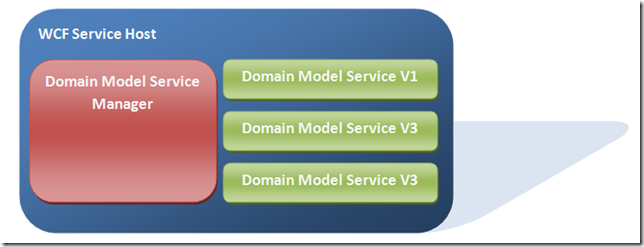
ServiceHost
The core idea is to host the OData services from within a WCF service. In the above diagram each of the Domain Model Service instances, in green, are listening at an address relative to a configured base address. For example http://localhost:port/Vx/DomainModelService, where Vx refers to the version of the Domain Model that the service is exposing, for example V1.

WCF hosting challenge


Each instance of a DomainModelService type that is to be exposed from the WCF service host, expects an instance of a DomainModelDescriptor  to be passed to the constructor.
/// <summary>
/// Initializes a new instance of the <see cref="DomainModelService"/> class.
/// </summary>
/// <param name="domainDescriptor">The <see="DomainModelDescriptor"> that this service has to represent.</param>
public DomainModelService(DomainModelDescriptor domainDescriptor) : this(domainDescriptor, DynamicTypeGenerator.Instance)
{
}

This non default constructor presents a challenge when using the WebServiceHost class to host an instance/instances of the DomainModelService. The WebServiceHost class is used, as opposed to the ServiceHost class, is due to the fact that the DomainModelService is an OData service and cannot be hosted using the ServiceHost class. The WebServiceHost class supports two modes of instantiation.
//
// Summary:
//     Initializes a new instance of the System.ServiceModel.Web.WebServiceHost
//     class with the specified singleton server instance and base address.
//
// Parameters:
//   singletonInstance:
//     A service instance to be used as the singleton instance.
//
//   baseAddresses:
//     The base address of the service.
public WebServiceHost(object singletonInstance, params Uri[] baseAddresses);
//
// Summary:
//     Initializes a new instance of the System.ServiceModel.Web.WebServiceHost
//     class with the specified service type and base address.
//
// Parameters:
//   serviceType:
//     The service type.
//
//   baseAddresses:
//     The base address of the service.
public WebServiceHost(Type serviceType, params Uri[] baseAddresses);

The constructor public WeServiceHost(Type serviceType, params Uri[] baseAddresses) cannot be used due to the fact that the DomainModelService does not have a non default constructor. Invoking this constructor will throw the following exception:

System.InvalidOperationException: The service type provided could not be loaded as a service because it does not have a default (parameter-less) constructor. To fix the problem, add a default constructor to the type, or pass an instance of the type to the host.

The second constructor public WebServiceHost(object singletonInstance, params Uri[] baseAddresses) can be used to host a instance of a DomainModelService. There is however one drawback to using this method of instantiation and that is the instance of the hosted service is a singleton. Having one instance to service all requests for data could potentially be a bottleneck, where by requests queue on the server side.

Solution


The solution to enabling the WCF framework to instance DomainModelService types is to control the instancing behaviour of the framework ourselves. This is done by implementing an IInstanceProvider derived type and an IServiceBehavior derived type to apply the IInstanceProvider.

The implementation of the IInstanceProvider derived DomainModelInstanceProvider, below, is pretty straight forward. It is passed an instance of an IDomainModelServiceMetadataProvider derived type. invokes the GetDomainModelMetadata method and stores the result. When the WCF framework invokes one of the GetInstance method overloads the DomainModelInstanceProvider constructs an instance of an DomainModelService passing the DomainModelDescriptor to the constructor.
/// <summary>
/// The instance provider for instances of <see cref="DomainModelServices"/>
/// </summary>
public class DomainModelInstanceProvider : IInstanceProvider
{
    private DomainModelDescriptor _domainModelDescriptor;
    
    /// <summary>
    /// Constructor
    /// </summary>
    /// <remarks>Retrieves an instance of a <see cref="DomainModelDescriptor"/> from the <see cref="IDomainModelServiceMetadataProvider"/> and stores it.</remarks>
    /// <param name="domainModelServiceMetadataProvider">The <see cref="IDomainModelServiceMetadataProvider"/> to retrieve a <see cref="DomainModelDescriptor"/> from</param>
    public DomainModelInstanceProvider(IDomainModelServiceMetadataProvider domainModelServiceMetadataProvider)
    {
        _domainModelDescriptor = domainModelServiceMetadataProvider.GetDomainModelMetadata(DomainModelServiceSettings.Current.DomainModelServiceActivationTimeout);
    }


    /// <summary>
    /// Get an instance of a <see cref="DomainModelService"/>
    /// </summary>
    /// <param name="instanceContext">The context for the instance</param>
    /// <param name="message">The message</param>
    /// <returns>An instance of a <see cref="DomainModelService"/></returns>
    public object GetInstance(InstanceContext instanceContext, Message message)
    {
        return new DomainModelService(_domainModelDescriptor);
    }
    /// <summary>
    /// Get an instance of a <see cref="DomainModelService"/>
    /// </summary>
    /// <param name="instanceContext">The context for the instance</param>
    /// <returns>An instance of a <see cref="DomainModelService"/></returns>
    public object GetInstance(InstanceContext instanceContext)
    {
        return GetInstance(instanceContext, null);
    }
    /// <summary>
    /// Release instance.
    /// <remarks>
    /// Nothing for this provider to do for this type
    /// </remarks>
    /// </summary>
    /// <param name="instanceContext"></param>
    /// <param name="instance"></param>
    public void ReleaseInstance(InstanceContext instanceContext, object instance)
    {
        return;
    }
}


/// <summary>
/// Defines methods for retrieving <see cref="DomainModelDescriptor"/> metadata
/// </summary>
public interface IDomainModelServiceMetadataProvider
{
    /// <summary>
    /// Retrieve an instance of a <see cref="DomainModelDescriptor"/>
    /// </summary>
    /// <param name="timeout">The time out for retreiving the metadata.</param>
    /// <returns>An instance of a <see cref="DomainModelDescriptor"/></returns>
    DomainModelDescriptor GetDomainModelMetadata(TimeSpan timeout);
}


/// <summary>
/// A custom instancing behaviour to apply to a service.
/// </summary>
public class DomainModelServiceInstancingBehaviour : IServiceBehavior
{
    private DomainModelInstanceProvider _instanceProvider;


    /// <summary>
    /// Constructor
    /// </summary>
    /// <param name="domainModelServiceMetadataProvider">An instance of an <see cref="IDomainModelServiceMetadataProvider"/></param>
    public DomainModelServiceInstancingBehaviour(IDomainModelServiceMetadataProvider domainModelServiceMetadataProvider)
    {
        _instanceProvider = new DomainModelInstanceProvider(domainModelServiceMetadataProvider);
    }


    /// <summary>
    /// Provides the ability to pass custom data to binding elements to support the contract implementation.
    /// </summary>
    /// <param name="serviceDescription">The service description of the service.</param>
    /// <param name="serviceHostBase">The host of the service.</param>
    /// <param name="endpoints">The service endpoints.</param>
    /// <param name="bindingParameters">Custom objects to which binding elements have access.</param>
    public void AddBindingParameters(ServiceDescription serviceDescription, ServiceHostBase serviceHostBase, Collection<ServiceEndpoint> endpoints, BindingParameterCollection bindingParameters)
    {
        return;
    }


    /// <summary>
    /// Provides the ability to change run-time property values or insert custom extension objects such as error handlers, message or parameter interceptors, security extensions, and other custom extension objects.
    /// </summary>
    /// <remarks>
    /// This <see cref="IServiceBehavior"/> type applies an instance of an <see cref="DomainModelInstanceProvider"/> to each of the <see cref="EndpointDispatcher"/> for the service host.
    /// </remarks>
    /// <param name="serviceDescription">The service description.</param>
    /// <param name="serviceHostBase">The host that is currently being built.</param>
    public void ApplyDispatchBehavior(ServiceDescription serviceDescription, ServiceHostBase serviceHostBase)
    {
        foreach (ChannelDispatcherBase cdb in serviceHostBase.ChannelDispatchers)
        {
            ChannelDispatcher cd = cdb as ChannelDispatcher;
            if (cd != null)
            {
                foreach (EndpointDispatcher ed in cd.Endpoints)
                {
                    ed.DispatchRuntime.InstanceProvider = _instanceProvider;
                }
            }
        }
    }


    /// <summary>
    /// Provides the ability to inspect the service host and the service description to confirm that the service can run successfully.
    /// </summary>
    /// <param name="serviceDescription">The service description.</param>
    /// <param name="serviceHostBase">The service host that is currently being constructed.</param>
    public void Validate(ServiceDescription serviceDescription, ServiceHostBase serviceHostBase)
    {
        return;
    }
}

The DomainModelInstanceProvider is applied to the service through the use of a behaviour. Again the behaviour is pretty straight forward implementation. It constructs and instance of an DomainModelInstanceProvider type and applies this instance to the EndpointDispatcher .DispatchRuntime.InstanceProvider property for each of the endpoints.
/// <summary>
/// A custom instancing behaviour to apply to a service.
/// </summary>
public class DomainModelServiceInstancingBehaviour : IServiceBehavior
{
    private DomainModelInstanceProvider _instanceProvider;


    /// <summary>
    /// Constructor
    /// </summary>
    /// <param name="domainModelServiceMetadataProvider">An instance of an <see cref="IDomainModelServiceMetadataProvider"/></param>
    public DomainModelServiceInstancingBehaviour(IDomainModelServiceMetadataProvider domainModelServiceMetadataProvider)
    {
        _instanceProvider = new DomainModelInstanceProvider(domainModelServiceMetadataProvider);
    }


    /// <summary>
    /// Provides the ability to pass custom data to binding elements to support the contract implementation.
    /// </summary>
    /// <param name="serviceDescription">The service description of the service.</param>
    /// <param name="serviceHostBase">The host of the service.</param>
    /// <param name="endpoints">The service endpoints.</param>
    /// <param name="bindingParameters">Custom objects to which binding elements have access.</param>
    public void AddBindingParameters(ServiceDescription serviceDescription, ServiceHostBase serviceHostBase, Collection<ServiceEndpoint> endpoints, BindingParameterCollection bindingParameters)
    {
        return;
    }


    /// <summary>
    /// Provides the ability to change run-time property values or insert custom extension objects such as error handlers, message or parameter interceptors, security extensions, and other custom extension objects.
    /// </summary>
    /// <remarks>
    /// This <see cref="IServiceBehavior"/> type applies an instance of an <see cref="DomainModelInstanceProvider"/> to each of the <see cref="EndpointDispatcher"/> for the service host.
    /// </remarks>
    /// <param name="serviceDescription">The service description.</param>
    /// <param name="serviceHostBase">The host that is currently being built.</param>
    public void ApplyDispatchBehavior(ServiceDescription serviceDescription, ServiceHostBase serviceHostBase)
    {
        foreach (ChannelDispatcherBase cdb in serviceHostBase.ChannelDispatchers)
        {
            ChannelDispatcher cd = cdb as ChannelDispatcher;
            if (cd != null)
            {
                foreach (EndpointDispatcher ed in cd.Endpoints)
                {
                    ed.DispatchRuntime.InstanceProvider = _instanceProvider;
                }
            }
        }
    }


    /// <summary>
    /// Provides the ability to inspect the service host and the service description to confirm that the service can run successfully.
    /// </summary>
    /// <param name="serviceDescription">The service description.</param>
    /// <param name="serviceHostBase">The service host that is currently being constructed.</param>
    public void Validate(ServiceDescription serviceDescription, ServiceHostBase serviceHostBase)
    {
        return;
    }
}

The behaviour is applied to the service host through the use of a WebServiceHostFactory derived type. The DomainModelServiceHostFactory type adds the DomainModelServiceInstancingBehaviour to the host. The DomainModelServiceHost type is derived from WebServiceHost and an interface IServiceHost, the interface is to abstract the underlying implementation to facilitate testing.
public class DomainModelServiceHostFactory : WebServiceHostFactory, IServiceHostFactory
{
    private readonly IDomainModelServiceMetadataProvider _domainModelServiceMetadataProvider;


    static DomainModelServiceHostFactory()
    {
        IoCContainer.Current = new IocContainerProxy();
    }


    /// <summary>
    /// Initializes a new instance of the <see cref="DomainModelServiceHostFactory"/> class.
    /// </summary>
    /// <param name="domainModelServiceMetadataProvider">The domain model service metadata provider.</param>
    public DomainModelServiceHostFactory(IDomainModelServiceMetadataProvider domainModelServiceMetadataProvider)
    {
        _domainModelServiceMetadataProvider = domainModelServiceMetadataProvider;
    }


    /// <summary>
    /// Creates an instance of the specified <see cref="T:System.ServiceModel.Web.WebServiceHost"/> derived class with the specified base addresses.
    /// </summary>
    /// <param name="serviceType">The type of service host to create.</param>
    /// <param name="baseAddresses">An array of base addresses for the service.</param>
    /// <returns>
    /// An instance of a <see cref="T:System.ServiceModel.ServiceHost"/> derived class.
    /// </returns>
    protected override ServiceHost CreateServiceHost(Type serviceType, Uri[] baseAddresses)
    {
        var host = new DomainModelServiceHost(serviceType, baseAddresses);


        host.Description.Behaviors.Add(new DomainModelServiceInstancingBehaviour(_domainModelServiceMetadataProvider));


        return host;
    }


    /// <summary>
    /// Creates the service host.
    /// </summary>
    /// <param name="serviceType">Type of the service.</param>
    /// <param name="baseAddresses">The base addresses.</param>
    /// <returns></returns>
    IServiceHost IServiceHostFactory.CreateServiceHost(Type serviceType, Uri[] baseAddresses)
    {
        return CreateServiceHost(serviceType, baseAddresses) as IServiceHost;
    }
}

At this point we now have the ability to host and instantiate instances of the DomainModelService. The final piece that is missing is a mechanism to orchestrate and manage the hosted DomainModelService instances. This responsibility falls to the DomainModelServiceManager class. It is responsible for the managing of the host instances and providing the metadata for each of the host instances that are started. It is not responsible for the validation and verification of the DomainModelMetadata, that is the responsibility of the containing WCF service.
public class DomainModelServiceManager : IDomainModelServiceManager, IDomainModelServiceMetadataProvider, IDisposable
{

….
}

The DomainModelServiceManager derives from the IDomainModelServiceManager and IDomainModelServiceMetadataProvider interfaces.

/// <summary>

/// An interface to define the methods and properties for a domain model service manager

/// </summary>

public interface IDomainModelServiceManager

{

    /// <summary>

    /// The event that is raised when a <see cref="DoaminModelService"/> is opened

    /// </summary>

    event EventHandler<DomainModelServiceOpenedEventArgs> OnDomainModelServiceOpened;

    /// <summary>

    /// The event that is raised when a <see cref="DoaminModelService"/> is closed

    /// </summary>

    event EventHandler<DomainModelServiceClosedEventArgs> OnDomainModelServiceClosed;

    /// <summary>

    /// The event that is raised when a <see cref="DoaminModelService"/> is closed

    /// </summary>

    event EventHandler<DomainModelServiceFaultedEventArgs> OnDomainModelServiceFaulted;

    /// <summary>

    /// Deacivate a <see cref="DoaminModelService"/> for the given idenitfier.

    /// </summary>

    /// <param name="identifier">The identifier of the <see cref="DomainModelDescriptor"/></param>

    void DeactivateDomainModelService(Guid identifier);

    /// <summary>

    /// Activate a <see cref="DoaminModelService"/> for a <see="DomainModelDescriptor"/>

    /// </summary>

    /// <param name="domainModelDescriptor">The descriptor that describes the structure of the entites of the domain model</param>

    /// <param name="baseAddress">The base address that the hosted <see cref="DoaminModelService"/> should be bound too</param>

    /// <param name="servicePath">The relative service path for the bound address. For example baseaddress/servicePath</param>

    /// <param name="activationTimeout">The amount of time to wait for the service host to be activated.</param>

    void ActivateDomainModelService(DomainModelDescriptor domainModelDescriptor, Uri baseAddress, String servicePath, TimeSpan activationTimeout);

    /// <summary>

    /// Gets a list of active <see cref="DoaminModelService"/>

    /// </summary>

    /// <returns>A <see cref="IDictionary<Guid, Uri>"/> the <see cref="Guid"/> is a unique identifier for the instance. The <see cref="Uri"/> is the address that the </returns>

    IDictionary<Guid, Uri> GetActiveDomainModelServices();

    /// <summary>

    /// Indicates if this instance has been initalised.

    /// </summary>

    bool IsInitalised { get; }

    /// <summary>

    /// Initalise the <see cref="IDomainModelServiceManager"/> instance

    /// </summary>

    /// <param name="domainModelDescriptors">The list of <see cref="DoaminModelService"/> to initalise</param>

    /// <param name="baseAddress">The base address that the hosted <see cref="DoaminModelService"/> should be bound too</param>

    /// <param name="servicePath">The relative service path for the bound address. For example baseaddress/servicePath</param>

    /// <param name="activationTimeout">The amount of time to wait for a given service host to be activated</param>

    void Initalise(IList<DomainModelDescriptor> domainModelDescriptors, Uri baseAddress, String servicePath, TimeSpan activationTimeout);

}

The key part of the DomainModelServiceManager is the activation and deactivation of DomainModelService instances. There are other functions that the DomainModelServiceManager performs such as logging, handling faulted Service Host instances, but these are ancillary to its core function of managing instances of hosted DomainModelService instances. Discussion of these features are excluded for the sake of brevity. The following code snippets describe the activation process in more detail.
private BlockingCollection<DomainModelDescriptor> _activatableDomainModels;
private List<DomainModelServiceInstance> _activatedDomainModels;
private IServiceHostFactory _serviceHostFactory;


public DomainModelServiceManager()
{
    ......
    
    // the DomainModelServiceManager is an IDomainModelServiceMetadataProvider derived type and can provide the metadata
    _serviceHostFactory = new DomainModelServiceHostFactory(this);
}
        
/// <summary>
/// Activate a <see cref="DoaminModelService"/> for a <see="DomainModelDescriptor"/>
/// </summary>
/// <param name="domainModelDescriptor">The descriptor that describes the structure of the entites of the domain model</param>
/// <param name="baseAddress">The base address that the hosted <see cref="DoaminModelService"/> should be bound too</param>
/// <param name="servicePath">The relative service path for the bound address. For example baseaddress/servicePath</param>
/// <param name="activationTimeout">The amount of time to wait for the service host to be activated.</param>
public void ActivateDomainModelService(DomainModelDescriptor domainModelDescriptor, Uri baseAddress, String servicePath, TimeSpan activationTimeout)
{
    _activatableDomainModels.Add(domainModelDescriptor);


    lock (_activatedDomainModels)
    {
        var domainModelService = CreateDomainModelServiceInstance(baseAddress, servicePath, domainModelDescriptor);


        _activatedDomainModels.Add(domainModelService);


        _logger.Debug("Domain model activation started");


        domainModelService.ServiceHostInstance.Open(activationTimeout);
   }
}
/// <summary>
/// Create a hosted instance of a <see cref="DomainModelService"/>
/// </summary>
/// <param name="domainModelDescriptor">The descriptor that describes the structure of the entites of the domain model</param>
/// <param name="baseAddress">The base address that the hosted <see cref="DoaminModelService"/> should be bound too</param>
/// <param name="servicePath">The relative service path for the bound address. For example baseaddress/servicePath</param>
/// <returns>A <see cref="DomainModelServiceInstance"/></returns>
private DomainModelServiceInstance CreateDomainModelServiceInstance(Uri baseAddress, String servicePath, DomainModelDescriptor domainModelDescriptor)
{
    UriBuilder builder = new UriBuilder(baseAddress);
    builder.Path = String.Format("V{0}/{1}", domainModelDescriptor.Version, servicePath);
    
    // The service host factory adds the instanceing behavior
    var host = _serviceHostFactory.CreateServiceHost(typeof(DomainModelService), new Uri[] { builder.Uri });


    host.Faulted += HandleHostFaulted;
    host.Opened += HandleHostOpened;
    host.Closed += HandleHostClosed;


    DomainModelServiceInstance instance = new DomainModelServiceInstance(domainModelDescriptor, host);


    return instance;
}


public DomainModelDescriptor GetDomainModelMetadata(TimeSpan timeout)
{
    DomainModelDescriptor descriptor = null;


    if(_activatableDomainModels.TryTake(out descriptor, timeout) == false)
    {
        throw new TimeoutException(String.Format("Unable to get domain model metadata within timeout '{0}'", timeout));
    }


    _logger.Debug("Retrived metadata for DomainModel {0} Version {1}", descriptor.Identifier, descriptor.Version);
    
    return descriptor;
}


/// <summary>
/// Handle the host opened event
/// </summary>
/// <remarks>
/// This removes the entry in the pending list and moves it to the activated list.
/// Rasies an event to signal that the open has occured
/// </remarks>
/// <param name="sender">The event sender</param>
/// <param name="e">The <see cref="System.EventArgs"/> instance containing the event data.</param>
protected internal void HandleHostOpened(object sender, EventArgs e)
{
    IServiceHost serviceHost =  ((IServiceHost)sender);


    _logger.Debug("Service host started {0}", serviceHost.BaseAddresses[0]);


    DomainModelServiceInstance openedDomainModel = null;


    lock (_activatedDomainModels)
    {
        openedDomainModel = (from dm in _activatedDomainModels where dm.ServiceHostInstance == sender select dm).FirstOrDefault();
    }


    if (openedDomainModel != null)
    {
        EventHelpers.RaiseEvent<DomainModelServiceOpenedEventArgs>(
        new DomainModelServiceOpenedEventArgs()
        {
            DomainModel = openedDomainModel.DomainModelMetadata
        }, OnDomainModelServiceOpened, this);
    }
    else
    {
        _logger.Warn("Faulted {0} could not be found for address {1}", typeof(DomainModelServiceInstance), serviceHost.BaseAddresses[0]);
    }
}

Deactivation of a DomainModelService is a far less involved process. The host simply has to be closed and the event handlers cleaned up.
/// <summary>
/// Deacivate a <see cref="DoaminModelService"/> for the given idenitfier.
/// </summary>
/// <param name="identifier">The identifier of the <see cref="DomainModelDescriptor"/></param>
public void DeactivateDomainModelService(Guid identifier)
{
    DomainModelServiceInstance domainModelServiceInstance = null;


    lock (_activatedDomainModels)
    {
        domainModelServiceInstance = _activatedDomainModels.Find(
            delegate(DomainModelServiceInstance instance)
            {
                return instance.DomainModelMetadata.Identifier == identifier;
            });
    }
    if (domainModelServiceInstance != null)
    {
        // close the service and detach event handlers
        DeactivateDomainModelService(domainModelServiceInstance);


        lock (_activatedDomainModels)
        {
            _activatedDomainModels.Remove(domainModelServiceInstance);
        }
    }
}

In the next post in the series Part 5 - End To End Example I will put together a detailed end to end example of how all of these component pieces fit together. Hopefully it will aid in the solidification of how the various ideas and concepts hang together.