Sometimes its necessary to allocate a number of expensive resources at runtime. These resources can be expensive in terms of threads or memory. They maybe individually expensive, have a large memory footprint, have a high number of threads or cumulatively expensive for example many instances have to be allocated. It may also be the case that the creation of the resource objects is an expensive task in itself.
To address this problem it is usual to implement an
object pool. This pattern is one of the creational design patterns, the intent of this pattern is to reuse and share objects that are expensive to create. It can also be put to use to manage objects that encapsulate expensive resources.
One of the implementation constraints of an
object pool implementation is the management of the number resources that are allocated by the object pool. The general implementation of an object pool supposes a fixed number of resources that are allocated when the pool is constructed and are destroyed when the object pool is destroyed.
For the specific problem I am trying to solve, fixed resource allocation is too restrictive, I need some elasticity in the pool. I require the pool to shrink and expand base on the number of outstanding requests for objects.
There are a number of options available to implement this elasticity for example
- A cache configured with sliding window flushing of least recently used resources
- A background thread that manages last access time and release resources
Both of the implementations above would allow the resource allocation to be elastic. Both have the disadvantage of there response time to clean up of unused resources contained within the pool. This is due to the fact that both will have some periodic interval for clean up. The sliding wind value for the cache and the polling interval for the threaded solution. Tuning an optimal “rate of elasticity” adds to the complexity of the solution. It also means that one needs to tune this rate for different applications that have different resource allocation profiles.
The solution that I have chosen is to allocate resources and maintain references with Weak References inside the resource pool. This allows the pool to respond to the request for resources and also to memory pressure on the system.
Dynamic Resource Pool
First lets define an interface for the resource pool. Using a generic interface allows the implementation of the pool to be abstracted from the implementation of the object pool.
/// <summary>
/// A resource pool that dynamically allocates and releases resources of type T
/// </summary>
/// <typeparam name="T"></typeparam>
public interface IDynamicResourcePool<T> where T : class
{
 /// <summary>
 /// Acquires a resource from the pool.
 /// </summary>
 /// <returns>An instance of a resource from the pool</returns>
 T AcquireResource();

 /// <summary>
 /// Release a resource back to the pool
 /// </summary>
 /// <param name="resource">The resource to release</param>
 void ReleaseResource(T resource);
}
Dissecting the
DynamicResourcePool first we look at the local variables and the constructor for the class.
private readonly ConcurrentQueue<WeakReference> _resources;

private readonly PerformanceCounter _rateOfCreation;
private readonly PerformanceCounter _rateOfRelease;
private readonly PerformanceCounter _rateOfAquire;
private readonly PerformanceCounter _totalResources;
private readonly Func<T> _factoryFunc;

/// <summary>
/// Construct an instance of a <see cref="DynamicResourcePool{T}"/>
/// </summary>
/// <param name="resourceFactoryFunc">The factory used to create resources</param>
public DynamicResourcePool(Func<T> resourceFactoryFunc)
{
 _resources = new ConcurrentQueue<WeakReference>();
 _factoryFunc = resourceFactoryFunc;

 if(PerformanceCounterCategory.Exists(CounterMetadata.CategoryName))
 {
  String instanceName = GetType().GetGenericArguments()[0].Name;

  _rateOfCreation = new PerformanceCounter(CounterMetadata.CategoryName, CounterMetadata.CreationCounterName, instanceName, false);
  _rateOfRelease = new PerformanceCounter(CounterMetadata.CategoryName, CounterMetadata.ReleasedCounterName, instanceName, false);
  _rateOfAquire = new PerformanceCounter(CounterMetadata.CategoryName, CounterMetadata.AquiredCounterName, instanceName, false);
  _totalResources = new PerformanceCounter(CounterMetadata.CategoryName, CounterMetadata.TotalCreatedCounterName, instanceName, false);
 }
}
The
ConcurrentQueue<WeakReference> is used to store the weak references that contain the allocated resources. There are also a set of performance counters for tracking the performance characteristics of the
DynamicResourcePool at runtime. The performance counters will be used later in this post to examine the
DynamicResourcePool.
Looking at the
AcquireResource operation excluding some code for incrementing and decrementing counters its actually pretty simple. Try dequeue a resource from the resources queue if either a resource cannot be dequeued or the dequeued resource is null, i.e. it had been garbage collected, then create a new resource via the factory. Note: because a queue is used as the resource container the release and acquire of resources are round robin. This behaviour could be made configurable by delegating the internal acquire and release operations to an Action<T> or Func<T> delegate like the factory method.
/// <summary>
/// Acquires a resource from the pool.
/// </summary>
/// <returns>An instance of a resource from the pool</returns>
public T AcquireResource()
{
 IncrementCounter(_rateOfAquire);
 WeakReference weakReference;
 T resource = default(T);

 if(_resources.TryDequeue(out weakReference))
 {
  resource = (T)(weakReference.Target);

  if(resource == null)
  {
   DecrementCounter(_totalResources);
  }
 }

 if(resource == null)
 {
  if(_factory != null)
  {
   IncrementCounter(_totalResources);
   IncrementCounter(_rateOfCreation);
   resource = _factoryFunc();
  }
 }

 return resource;
}
The Release method is really simple. The resource is simply queued back in the resource pool.
/// <summary>
/// Release a resource back to the pool
/// </summary>
/// <param name="resource">The resource to release</param>
/// <exception cref="ArgumentNullException">Thrown when the argument is resource is null</exception>
public void ReleaseResource(T resource)
{
 IncrementCounter(_rateOfRelease);

 if(resource == null)
 {
  throw new ArgumentNullException("resource");
 }

 _resources.Enqueue(new WeakReference(resource));
}
Test Client
To demonstrate the behaviour of the
DynamicResourcePool the test client performs the following:
- Defines a resource type, ByteBuffer
- Creates a DynamicResourcePool <ByteBuffer>
- Starts a number of Tasks to allocate and release ByteBuffer resources
- Forces a garbage collection
- At each stage reports the memory consumption of the process
After running the test client the following output is displayed.

The
Memory to be Allocated figure indicates the amount of bytes that the
ByteBuffer instances will contain, this is 10Mb each times 20 tasks. The
Memory used after Allocation shows the initial processes allocated managed memory plus the memory allocated for the 20
ByteBuffer instances. The test client forces a garbage collection cycle, since there are no tasks running at this point all
ByteBuffer instances are collected.
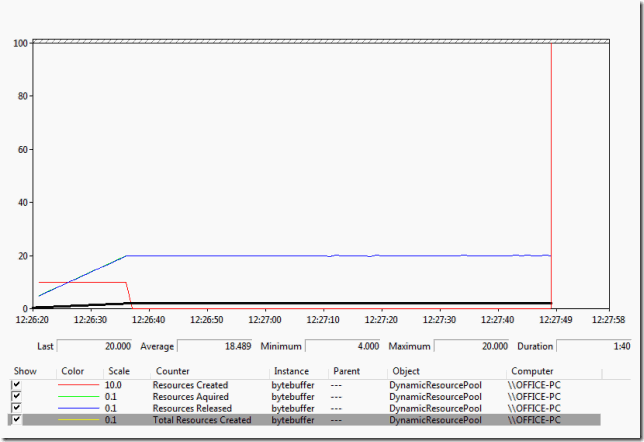
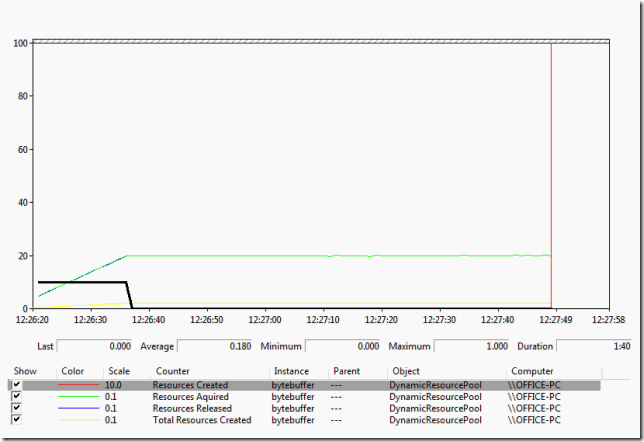
Looking at the performance counters we can see the behaviour of the
DynamicResourcePool. First the
Total Resources Created counter shows that it starts at zero and rises linearly to 20, which corresponds to the allocation profile of the Tasks.
The
Resources Created counter shows that the
DynamicResourcePool creates resources initially and then stops when the
Total Resources Created reaches 20 as expected.
The
Resources Acquired counter shows the rate of resources acquired. The
Resources Release counter tracks the acquired counter due to the nature of the test client code. The
Resources Acquired counter reaches about 200 per second which is as expected as the test code acquires and releases a resource every 100 milliseconds on 20 separate threads.

Further Enhancements
- Allow acquire and release strategy to be configured.
- Allow the pool to pre allocate resources at construction time
Source Code
Note: you will need to launch either VS or the test client as administrator as it registers performance counters.
The code is available here:
GitHub DumpingCoreMemory.ResoucePooling


