In
Part 1 I demonstrated how to generate a simple SAML2 token using the WIF 4.5 libraries. To finish this out I will now describe how to read a SAML2 token that was previously generated with the
SamlTokenProcessor class.
Read Token
In order to read an encrypted and signed SAML2 token an instance of a
SecurityTokenHandler class is required that has the correct configuration. Specifically we need an instance of an
Saml2SecurityTokenHandler class. It is possible to create an instance of this class and configure it through code, an alternate approach is to use the WIF configuration classes to configure and create an instance of a
Saml2SecurityTokenHandler. This is a preferred approach because it provides some level of flexibility to the
SamlTokenProcessor. Below is an example of how to create the
Saml2SecurityTokenHandler from the
IdentityConfiguration.
IdentityConfiguration configuration = new IdentityConfiguration();

_saml2SecurityTokenHandler = configuration.SecurityTokenHandlers[typeof(Saml2SecurityToken)];

_saml2SecurityTokenHandler.Configuration.ServiceTokenResolver =
 new X509CertificateStoreTokenResolver(StoreName.My, StoreLocation.CurrentUser);
The
Saml2SecurityTokenHandler instance requires a security token resolver. This is a class that is able to resolve the signing and encrypting certificates that where originally used to create the SAML2 token. The
IdentityConfiguration class expects a configuration section in the application configuration file.
<configSections>
    <section name="system.identityModel" type="System.IdentityModel.Configuration.SystemIdentityModelSection, System.IdentityModel, Version=4.0.0.0, Culture=neutral, PublicKeyToken=B77A5C561934E089" />
  </configSections>
The configuration required for the example application is as follows, this configuration is a basic configuration which is used for token validation, more on this later. The configuration can be used to configure replay detection for tokens or the maximum clock skew between the token generator and the token consumer.
<system.identityModel>
<identityConfiguration>
<audienceUris>
<add value="http://rp.com/" />
</audienceUris>
<issuerNameRegistry type="System.IdentityModel.Tokens.ConfigurationBasedIssuerNameRegistry, System.IdentityModel, Version=4.0.0.0, Culture=neutral, PublicKeyToken=b77a5c561934e089">
<trustedIssuers>
<add thumbprint="0D274A03BDCA95015E712E2808F917C93159ED1B"/>
</trustedIssuers>
</issuerNameRegistry>
</identityConfiguration>
</system.identityModel>
Note: The thumbprint element value must be set to the thumbprint of the STS identity certificate that was generated or acquired from a CA. Also be careful copy and pasting the thumbprint as it can copy with BOM data in the string.
Now that we have an instance of a
Saml2SecurityTokenHandler it can be used to read a token from a stream.
public SecurityToken ReadSecurityToken(Stream stream)
{
 SecurityToken securityToken;

 using(XmlReader rdr = new XmlTextReader(stream))
 {
  securityToken = _saml2SecurityTokenHandler.ReadToken(rdr);
 }

 return securityToken;
}
Validate Token
The
VerifySecurityToken method of the
SamlTokenProcessor class can verify a SAML2 token against the configuration specified in the configuration file. A prerequisite to verifying the SAML2 token generated is to ensure that the signing token is present in the certificate store under TrustedPeople.
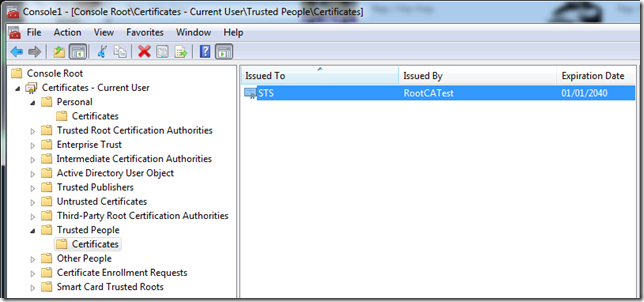
The
VerifySecurityToken method will verify the attributes of the token against the configuration. As a test the audienceUri can be modified to cause the verification to fail.
<audienceUris>
 <add value="http://rp2.com/" />
</audienceUris>
When the test application is run using this configuration an AudienceUriValidationFailedException exception will be thrown.
System.IdentityModel.Tokens.AudienceUriValidationFailedException: ID1038: The AudienceRestrictionCondition was not valid because the specified Audience is not present in AudienceUris.
Audience: 'http://rp.com/'
at System.IdentityModel.Tokens.Saml2SecurityTokenHandler.ValidateToken(SecurityToken token)
at CoreMemoryDump.Saml.SamlTokenProcessor.VerifySecurityToken(SecurityToken securityToken) in c:\Users\Office\Documents\Visual Studio 2012\Projects\CoreMemoryDump.Saml\CoreMemoryDump.Saml\SamlToken
Processor.cs:line 92
at CoreMemoryDump.SamlTest.Program.Main(String[] args) in c:\Users\Office\Documents\Visual Studio 2012\Projects\CoreMemoryDump.Saml\CoreMemoryDump.SamlTest\Program.cs:line 47
Similarly modifying the TrustedIssuers list will elicit an exception indicating that the issuer is not trusted.
Summary
The intent of this example code was to show that it is possible to generate, read and verify a SAML token using the base libraries from the WIF 4.5 framework. This example provides a basic implementation that can be extended to enable greater flexibility for generating SAML tokens.
The code is available here:
GitHub DumpingCoreMemory.Saml


